Blog
Before You Deploy an Agent, Know Where It Belongs
AI agents can transform how organizations operate, but only if you put them to work in the right places. The hardest part isn't the technology itself. It's figuring out which workflows are actually worth automating, and in what order.
By Steve Brown
Every organization my team and I work with faces the same issue, hiding in plain sight. Their people spend enormous amounts of time on work that really shouldn't require human effort. Not because the work is unimportant. But because it's repetitive, rule-bound, multi-step, and frankly exhausting. Think data re-entry, status updates, report generation, and cross-system lookups. It's the daily grind that often goes unnoticed until burnout hits or someone finally asks, "Why are we still doing this by hand?"
AI agents are autonomous digital workers. They can perceive situations, make decisions, and take action across different software tools. They offer a real solution to that question. But most organizations fall into a common trap. They jump straight to deploying agents before understanding where those agents should actually operate. They automate whatever is top of mind or what the loudest voice complains about. The result? A scattered collection of automations that don't add up to any real progress.
"The real question isn't whether AI agents can help. Of course they can. The question is whether you know your workflows well enough to direct them toward the right ones."
Mapping the Terrain: Where Can Agents Actually Work?
Before you prioritize, you have to see the full picture. Most organizations lack a systematic inventory of their operational workflows. They don't track the workflows, how often they run, who handles them, or the friction they create. This inventory is your starting point.
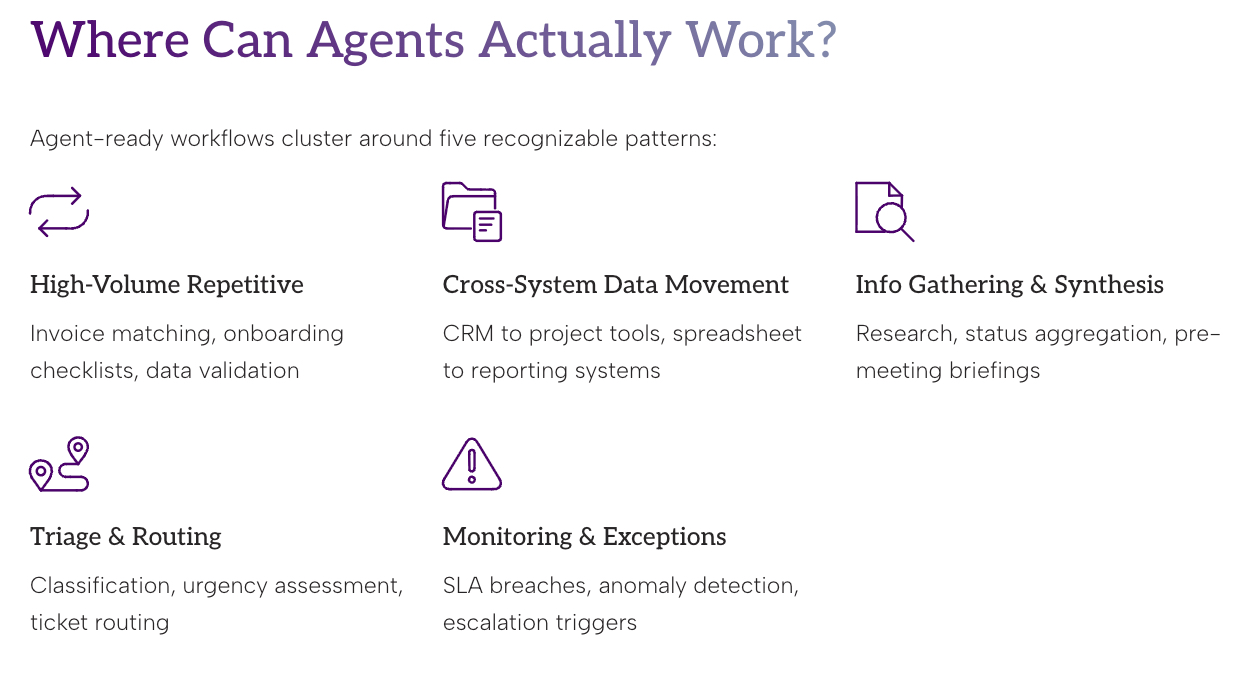
At ACTAVA.ai, we've seen that agent-ready workflows often fall into a few clear patterns:
High-Volume, Repetitive Processing
Workflows that happen dozens or hundreds of times each week follow predictable sequences. They need little judgment. Examples include invoice matching, onboarding checklists, form routing, and data validation. Agents never get tired or cut corners late on a Friday afternoon. These are usually the easiest wins. They help build quick confidence in AI automation.
Cross-System Data Movement
Humans often serve as the glue between different software platforms. They copy records from a CRM into a project tool, pull data from spreadsheets into reporting systems, or transcribe information from one interface into another. These tasks are painful, error-prone, and highly automatable. Yet they're invisible on most org charts. That's why they stick around.
Information Gathering and Synthesis
This covers research tasks, status reports, pre-meeting briefings, competitive monitoring, and document summarization. The main job is pulling information from multiple sources and turning it into something useful. These are mentally draining even if they're straightforward. They eat up time that senior staff can rarely spare..
Triage and Routing
Incoming requests, whether customer inquiries, internal tickets, or support cases, often need initial classification, urgency checks, and routing before a human adds real value. Agents can manage this first pass at scale. It gets the right work to the right people faster, and nothing slips through during busy times.
Monitoring and Exception Handling
Many workflows stay hidden until something goes wrong. An SLA is missed, a threshold is crossed, or a file doesn't appear. Agents excel at constant monitoring. They spot anomalies, highlight exceptions, and trigger escalations. No one has to babysit dashboards anymore.
A Note on What Agents Can't Do (Yet)
Agents do best in structured, high-volume, rule-based settings. They still struggle with true creative judgment, nuanced relationships, novel problems, or deep organizational politics. The aim isn't to replace human expertise. It's to free it up by handling the tasks that don't need it.
The best deployments treat agents as force multipliers for human judgment, not replacements.
How to Prioritize: Turning Inventory Into a Roadmap
Once you have visibility into your workflows, the next step is choosing where to begin. Not every workflow automates equally well. Not every automation delivers the same value. Prioritization is where strategy meets real-world practicality. This prioritization is where many organizations succeed or waste months on projects no one actually wanted.
We assess workflows on two key dimensions: automation potential (how feasible is it?) and operational impact (how much does it matter?). This creates a clear, defensible framework for decisions.
Automation Potential: Signal Checklist
A workflow scores high here if it shows most of these traits:
It involves multiple systems, but you can delegate the required access and permissions.
It avoids high-stakes judgment calls that could be irreversible.
It follows a predictable sequence with clear rules and few exceptions.
Data inputs are structured or semi-structured. No heavy interpretation needed.
It involves multiple systems, but you can delegate the required access and permissions.
You can clearly measure success and failure. You know when it's done right.
It avoids high-stakes judgment calls that could be irreversible.
Operational Impact: What's the Real Cost?
High-impact workflows provide relief in several ways:
Time: How many total hours per week do people spend on this?
Frequency: Does it happen daily? Multiple times a day? Daily wins compound fast.
Error Cost: What rework, delays, or reputational hits come from mistakes?
Human Toll: Does it drive stress, burnout, or turnover? Don't underestimate this one.
The Priority Matrix
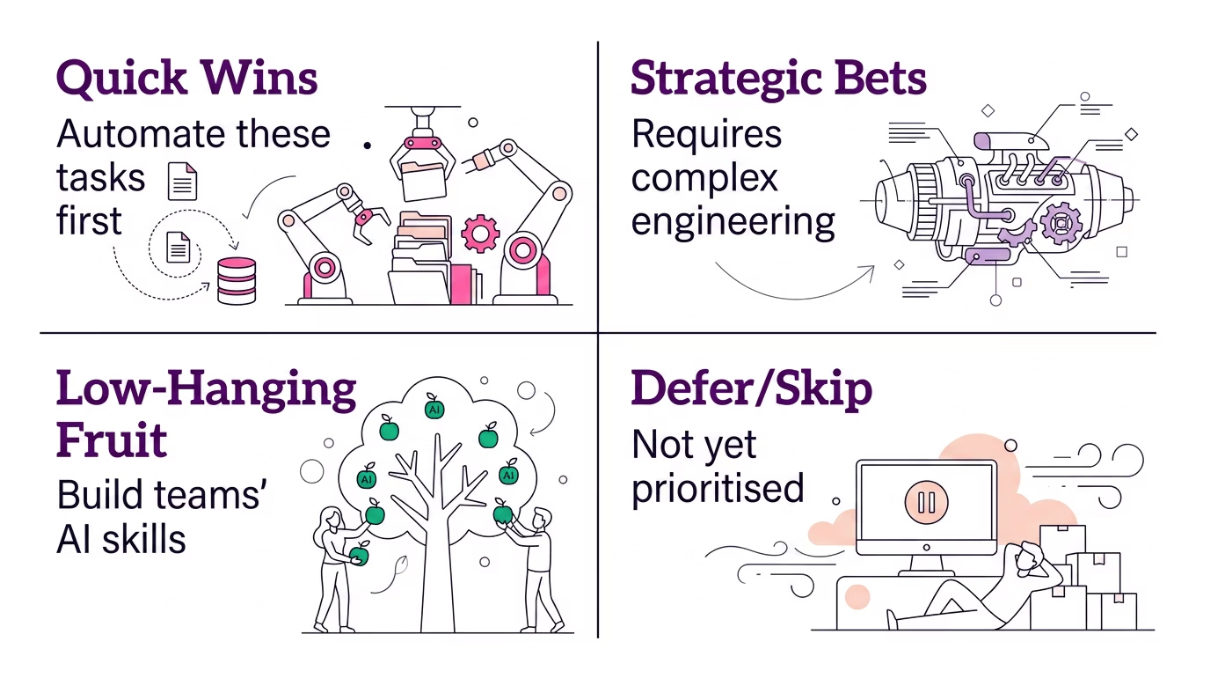
Place your workflows into these four quadrants, starting in the top left.
Wave 1: Quick Wins
High automation potential plus high operational impact. These are clear, frequent, and painful. Automate them first to build momentum and show quick value.
Wave 2: Strategic Bets
Lower automation potential but high impact. These are worth the extra effort. They may need custom agents or hybrid human-AI approaches.
Wave 3: Low-Hanging Fruit
High automation potential but lower impact. Easy to build with modest returns. Great for building team skills, but don't lead with them.
Defer or Skip: Not Yet
Low potential and low impact. Revisit later or ask if they even need to exist.
Sequencing Principles
The matrix helps, but keep these principles in mind:
Begin where the pain is loudest. Buy-in for AI drops quickly if early projects miss what people actually care about. Pain is a powerful signal. Follow it.
Build in public. Share early projects with clear before-and-after metrics. This turns skeptics into supporters and justifies more budget.
Respect dependencies. Some big workflows only become feasible after you standardize lower-level processes. Map these out first.
Measure human impact beyond efficiency. The strongest case for ongoing investment isn't just hours saved. It's less cognitive overload, lower stress, and better workplace culture. Call this out in your business case.
Wrapping it Up - The Assessment Is the Strategy
This is why we start every project at ACTAVA.ai with a structured workflow assessment. It's not just for filling slides. The real value comes from naming, measuring, and rating your workflows together. Most organizations have never had a shared, prioritized map of AI opportunities.
The survey below kickstarts that process. Answer it honestly. The magic isn't in one answer. It's in the patterns you see when you apply the same questions across your team.
That pattern becomes your roadmap. It helps you avoid putting agents in the wrong spots and focus on what truly matters.
You don't have a technology problem. You have a visibility problem. The workflows that would benefit most from AI are often the ones no one has ever fully documented.
Key Takeaways
Map before you build. Inventory your workflows first.
Use two dimensions, one matrix. The automation potential vs. operational impact gives your framework.
Follow the pain. Start where the human cost is highest, not just where tech is simplest.
Sample Agent Use Case Survey
This survey aims to identify workflows across our organization that may benefit from optimization and potential AI support. Please describe two workflows that you believe are inefficient, burdensome, repetitive, labor-intensive, or could be improved. For each workflow, answer all questions below.
1. Briefly name or describe the workflow:
2. How often does this workflow occur?
☐ 1: Less than monthly
☐ 2: Monthly
☐ 3: Weekly
☐ 4: Daily
☐ 5: Multiple times per day
3. For a typical instance, how much active staff time is required (hands-on work, not waiting)?
☐ 1: Less than 5 minutes
☐ 2: 5–15 minutes
☐ 3: 16–30 minutes
☐ 4: 31–60 minutes
☐ 5: More than 60 minutes
4. What is the total elapsed time from start to finish (including waiting/queueing)?
☐ 1: Less than 1 hour
☐ 2: 1–4 hours
☐ 3: Same day
☐ 4: 1–7 days
☐ 5: More than 1 week
5. How many distinct steps are involved?
☐ 1: 1–3 steps
☐ 2: 4–10 steps
☐ 3: 11–15 steps
☐ 4: 16–20 steps
☐ 5: 20+ steps or difficult to count
6. How many different roles/people are typically involved?
☐ 1: 1 person
☐ 2: 2 people
☐ 3: 3 people
☐ 4: 4–5 people
☐ 5: 6+ people or multiple departments
7. How many computer systems/software platforms are required?
☐ 1: 1 system
☐ 2: 2 systems
☐ 3: 3–4 systems
☐ 4: 5–6 systems
☐ 5: 7+ systems
8. How much manual data transfer (copy-paste, re-entry, transcription) is required?
☐ 1: None
☐ 2: Minimal
☐ 3: Moderate
☐ 4: Substantial
☐ 5: Extensive
9. How predictable is this workflow?
☐ 1: Highly variable/case-by-case
☐ 2: Often variable
☐ 3: Mixed (standard path + frequent exceptions)
☐ 4: Mostly standardized
☐ 5: Highly standardized
10. How often does this workflow require corrections or rework?
☐ 1: Almost never
☐ 2: Rarely
☐ 3: Sometimes
☐ 4: Often
☐ 5: Very often
11. When performing this workflow, how often is the necessary information missing?
☐ 1: Always available
☐ 2: Usually available
☐ 3: Sometimes missing
☐ 4: Frequently missing
☐ 5: Almost always requires searching or chasing information
12. How mentally demanding is this workflow?
☐ 1: Very low mental demand
☐ 2: Low
☐ 3: Moderate
☐ 4: High
☐ 5: Extremely high
13. How often is this workflow interrupted or fragmented by competing demands?
☐ 1: Almost never interrupted
☐ 2: Occasionally interrupted
☐ 3: Moderately interrupted
☐ 4: Frequently interrupted
☐ 5: Constantly interrupted / highly fragmented
14. How much does this workflow contribute to stress or burnout?
☐ 1: Not at all
☐ 2: Slightly
☐ 3: Moderately
☐ 4: Significantly
☐ 5: Extremely (major contributor to stress)

Written by
Steve Brown
Chief Customer Officer