Release Notes
Actava.ai Platform Release Notes v3 (March 2026)
Release at a glance: 10 new platform features, 14 Agent Studio improvements, 3 runtime & chat UX upgrades, 7 evaluation enhancements, and 6 infrastructure & reliability improvements — 40 total items across 5 categories.
By Deon Metelski
The March '26 v3.0 release transforms Actava.ai agents into full participants in enterprise workflows — sending professionally branded emails to request multi-channel stakeholder oversight in Slack and Email, generate interactive Mapbox maps. New quota enforcement and measurement upgrades provide admins with real-time visibility into token consumption and run costs. A revitalized Agent Studio with visual flow diagrams, an AI-powered builder wizard, and a searchable, filterable run history. And org-scoped MCP controls deliver the governance and resource management that enterprise buyers expect.
Key Feature Highlights
Agent Flow Visualization: A new SVG-rendered diagram in the Agent Builder that maps the full topology of an agent's steps, tools, and dependencies.
Human-in-the-Loop (HITL) 2.0: Multi-approver governance workflows delivered via Slack and Email, featuring AI-generated summaries and clinician-level auditability.
Specialized Search Suite: Purpose-built tools for deep research across Academic literature, GitHub repositories, and LinkedIn profiles.
Interactive Branding: Agents now generate themed HTML artifacts and Mapbox visualizations that inherit your organization’s specific brand identity.
Cost & Quota Transparency: A new Benchmark Usage dashboard provides category-level cost breakdowns , while real-time indicators track context window usage.
New Features
Agent Flow Visualization
See how your agent thinks, at a glance.
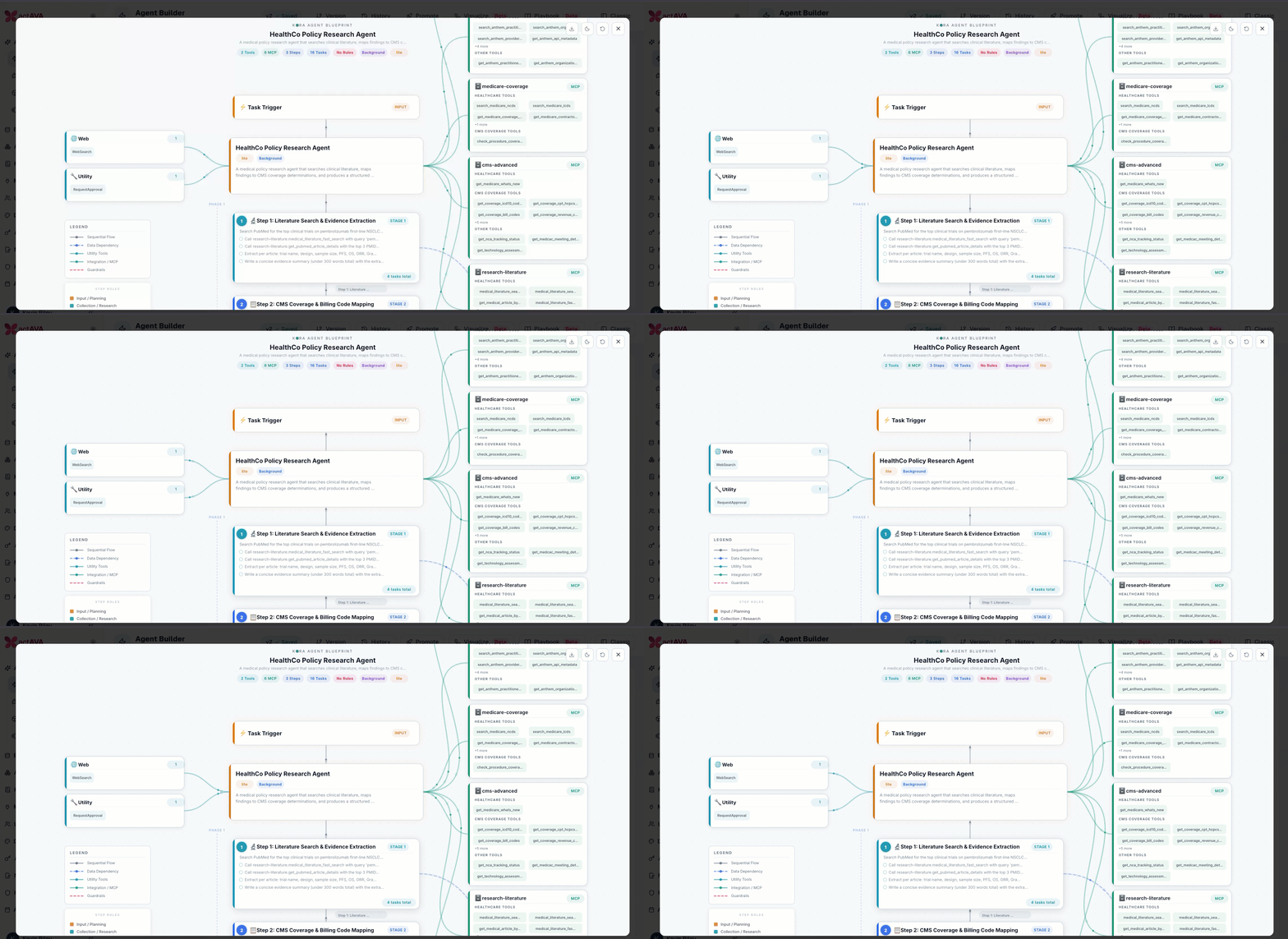
A new visual diagram in the agent builder renders the full topology of an agent's steps, tools, and dependencies — making it dramatically easier to onboard stakeholders, demo agent capabilities, and audit complex workflows.
Pure SVG rendering: Agent flow with icons, info, edge labels, legends, and phase markers
AI-powered dependency detection: Automatic artifact-based analysis of step relationships
Audit insights panel: AI-generated observations about the agent's structure
Theme support and step role legend
Actava.ai Internal Knowledge MCP Server
Point KORA to your own code base to use as your internal expert for sales and marketing teams.
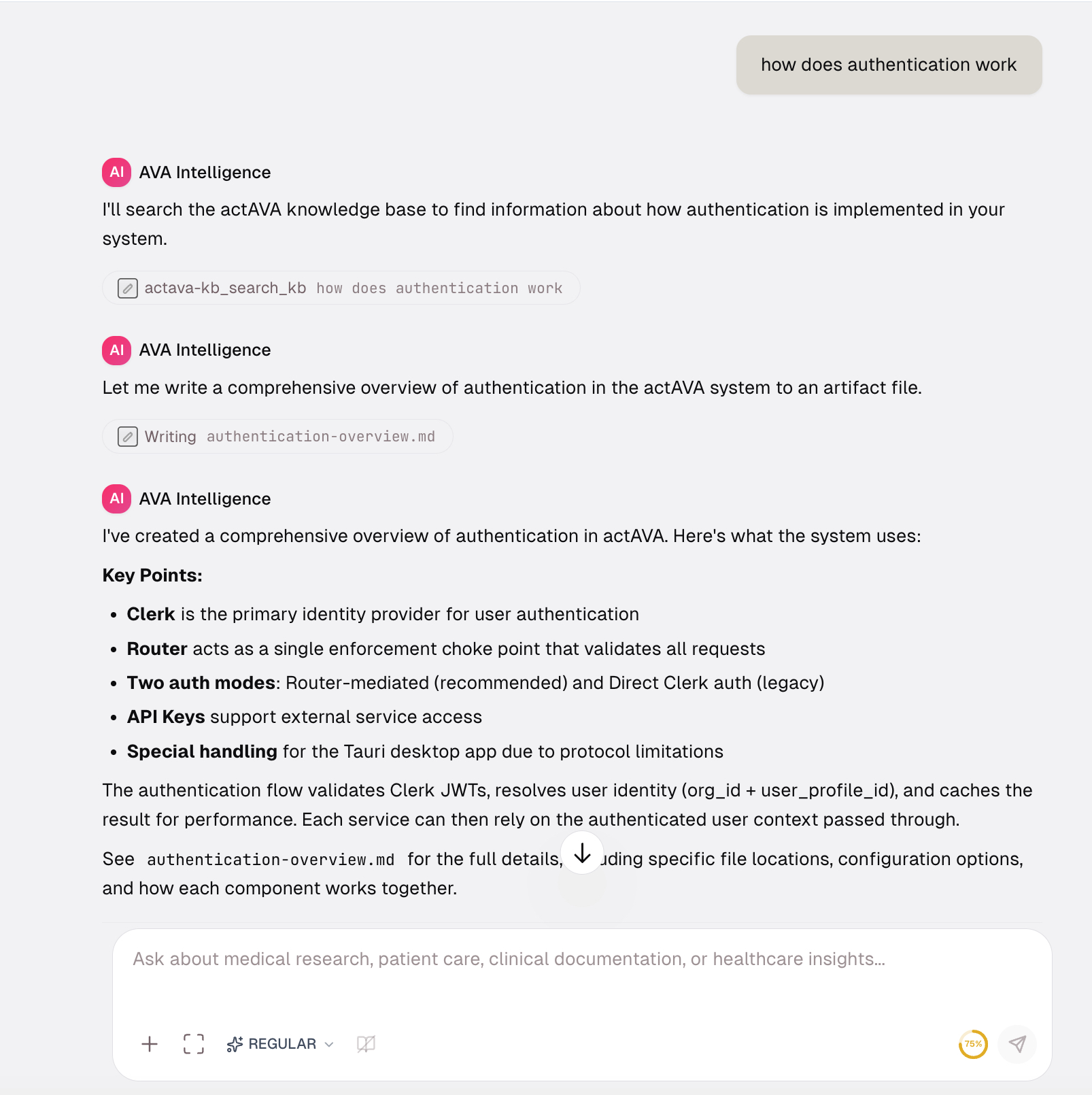
Connect our AVA RAG knowledge base into your code set to act as a definite technical source
Query AVA with sales and marketing questions to support your efforts
Email Integration + Human-in-the-Loop
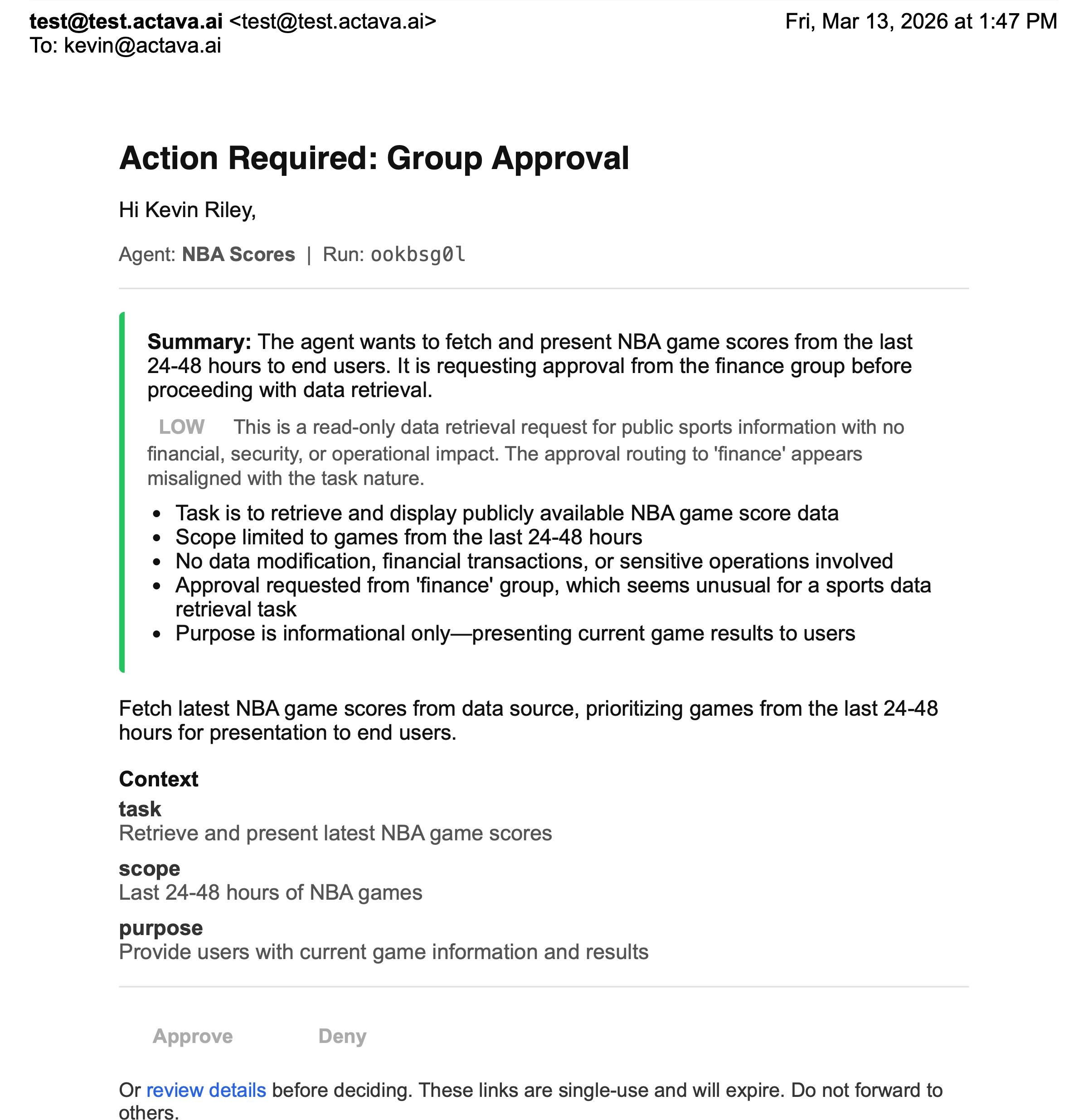
Branded outbound email, powered by agents, that interact within your email interface.
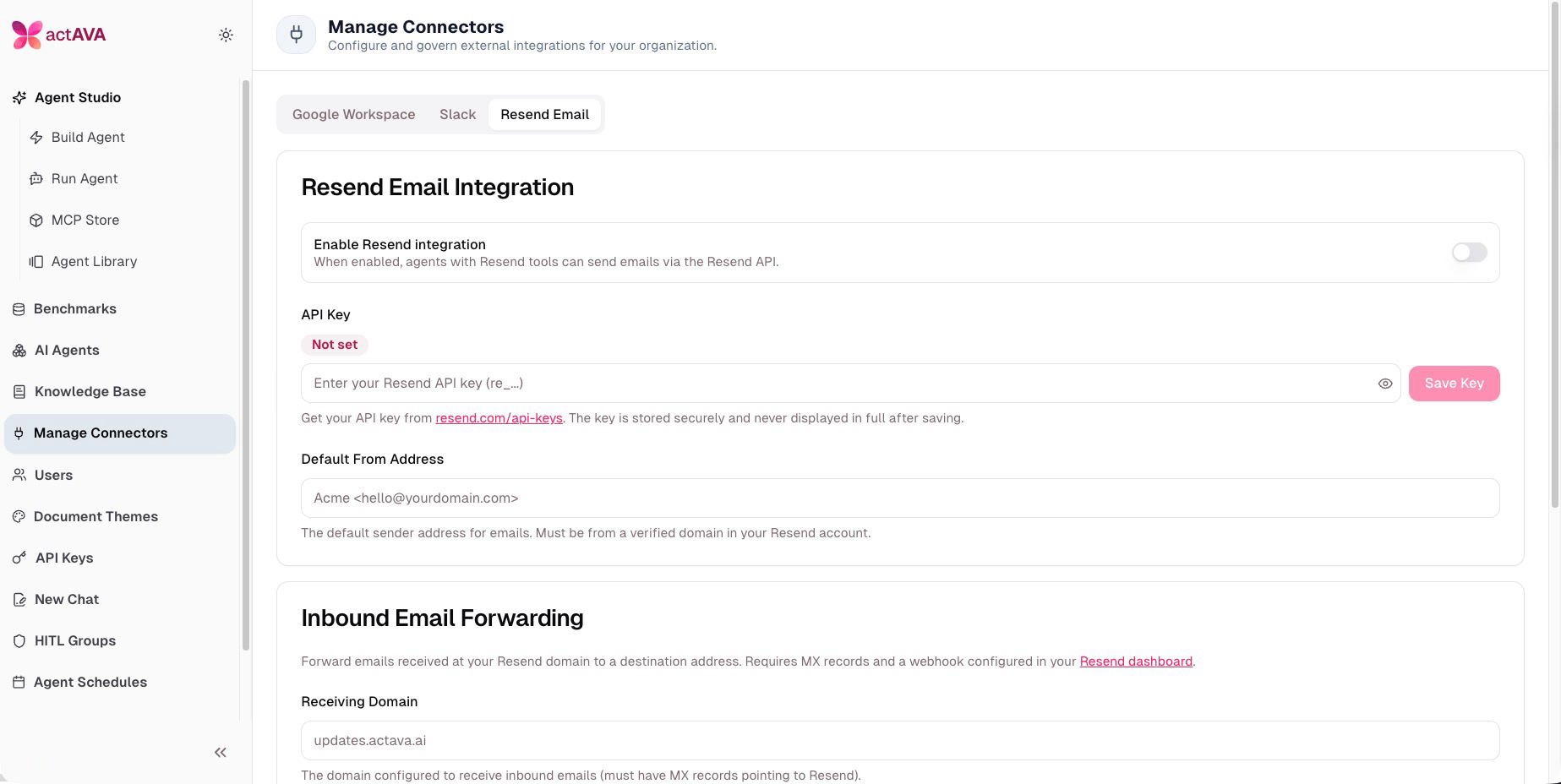
Healthcare communication demands trust, and trust starts with branding. With this release, Actava.ai agents can send individually crafted or batch emails with built-in approvals. You can use any organizational HTML templates to ensure you stay on brand. You can now have agents supercharge workflows like patient outreach, referral confirmations, and payer notifications that look and feel like they come from your team.
Backend: Resend admin API for org-level configuration, webhook endpoint with Svix signature verification for delivery tracking
Admin UI: New "Resend Email" tab in Manage Connectors with inbound email forwarding configuration
Agent Studio: ResendSendEmail and ResendSendBatchEmail tools wired into the agent builder, plus email_theme_html field on AgentCard for branded email styling
Slack Integration + Human-in-the-Loop
Multi-approver governance workflows, delivered in Slack.
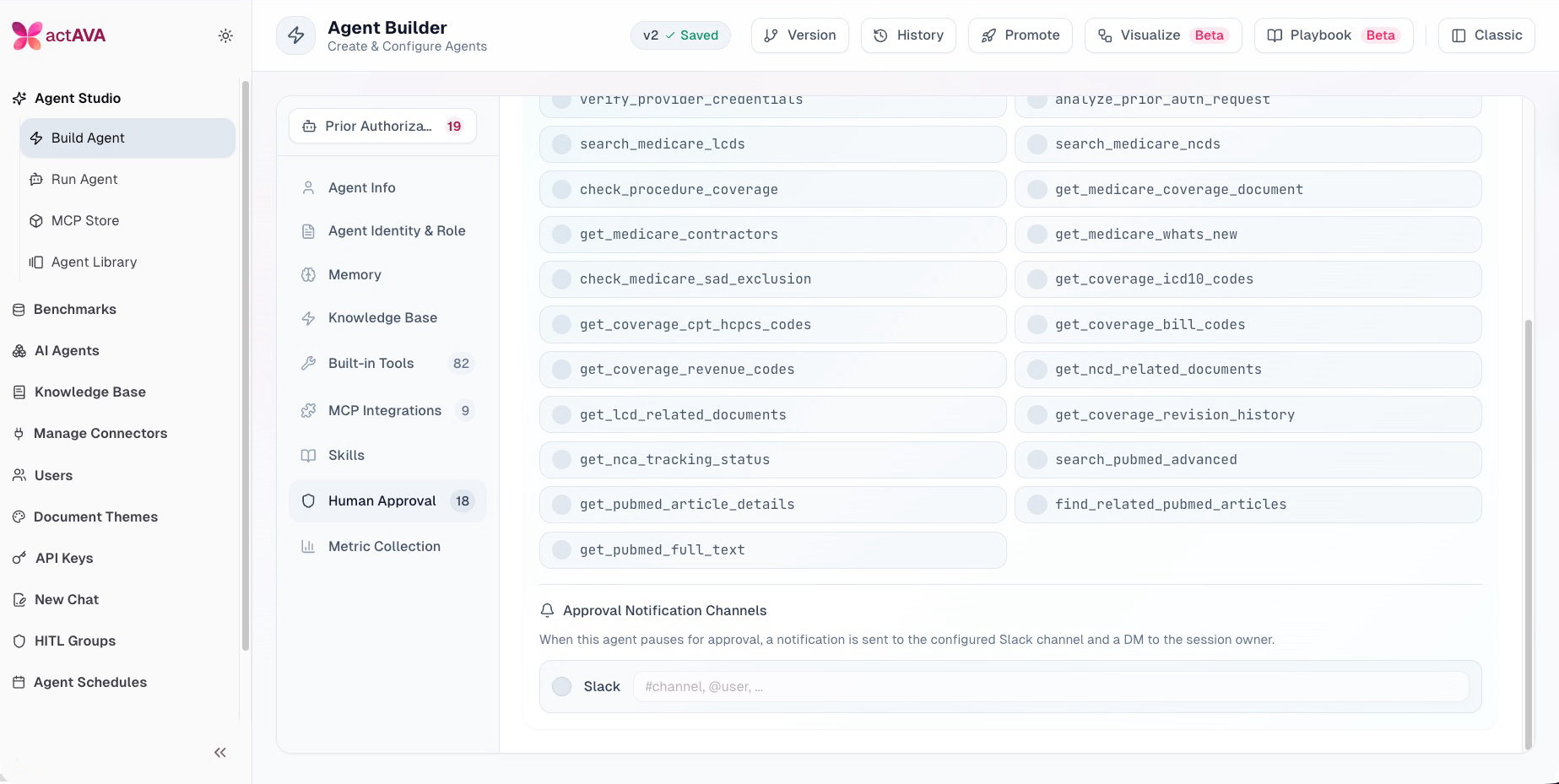
Enterprise healthcare workflows often require sign-off from multiple stakeholders before an agent proceeds — a clinical reviewer, a compliance officer, a department lead. This release introduces full Slack integration with a purpose-built human-in-the-loop notification system, expanded from single-user approval to multi-approver group workflows with AI-generated summaries and confirmation safeguards.
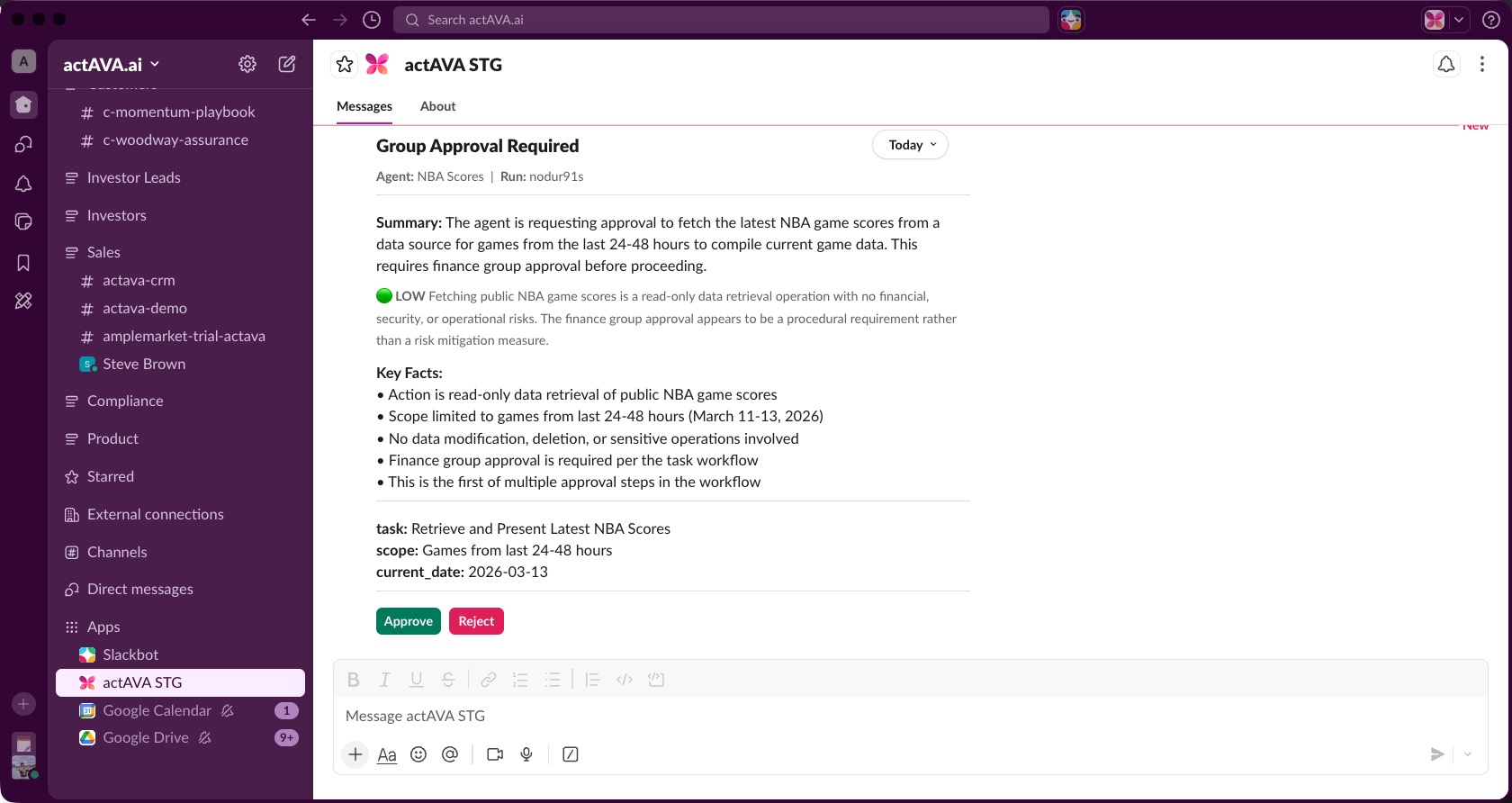
Slack integration: Full OAuth flow with backend routes, callback handling, messaging tools, and role-based access in Manage Connectors
HITL notifications: Agents pause critical workflows and request clinician approval directly in Slack with full auditability
Group approvals: New hitl_group_approval tables, multi-approver workflow repositories, group management UI, and RequestApproval tool
Richer context: Approval notifications now include AI-generated summaries, optional attachments, and confirmation protection against accidental actions
MCP grouping: MCP tools grouped by server in the Human Approval section for clearer configuration
Endpoint to list Slack workspace users for easy group member assignment
Interactive Maps — GenerateMap Tool
Agents that can show, not just tell.
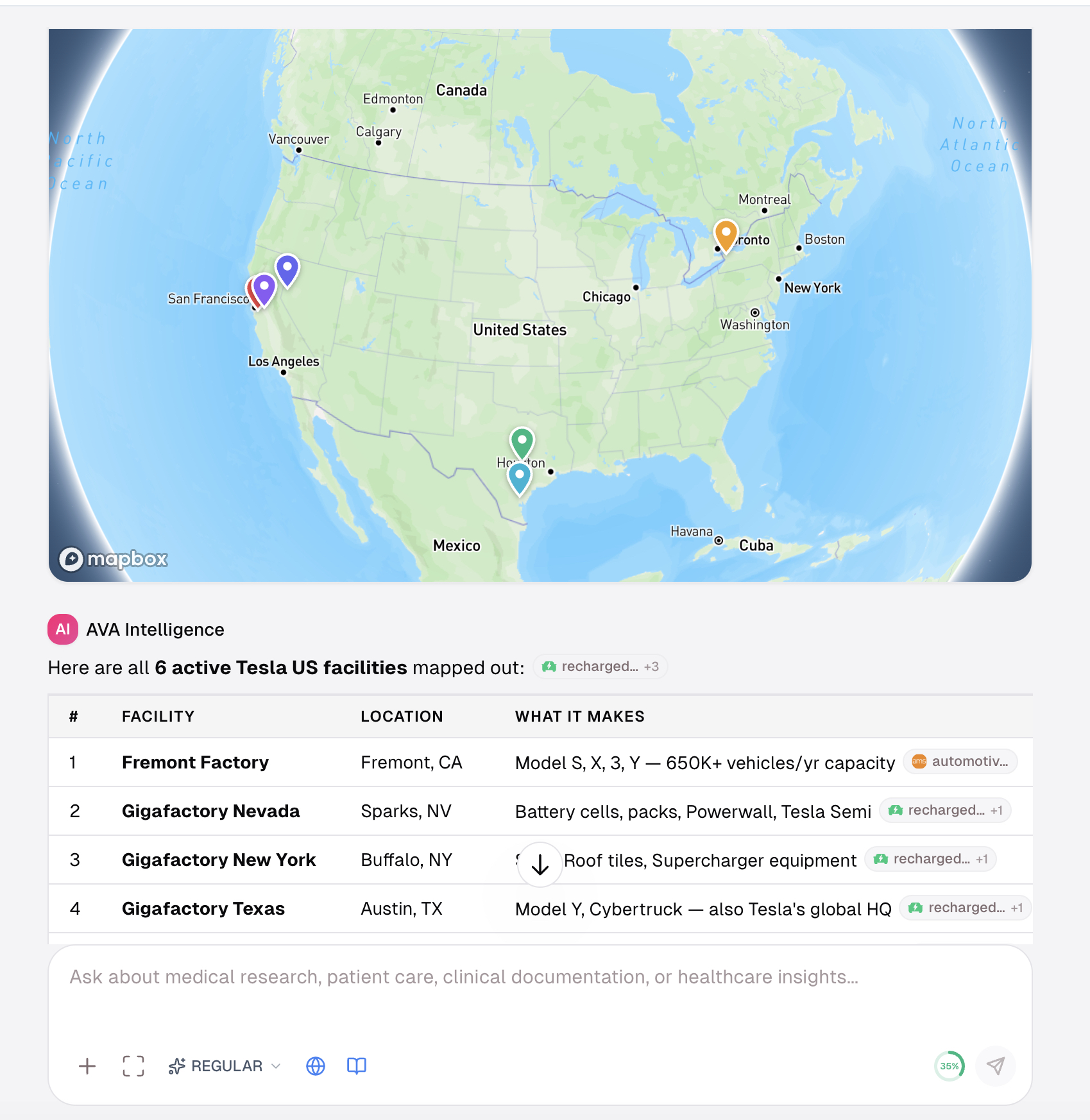
Agents can now generate interactive Mapbox-powered maps with markers, descriptions, and branded theming — ideal for care facility locators, network adequacy visualizations, and provider directory demos.
Mapbox API tools: Markers with descriptions, interactive map rendering added to the agent toolset
GenerateHTML tool: Agents produce rich HTML artifacts with the Mapbox token auto-injected into previews
Brand theming: Maps and HTML artifacts inherit the agent's FormatCard brand theme
Full-screen map support with streaming sparkle animation
HTML Theme & Brand Customization
Every artifact carries your identity.
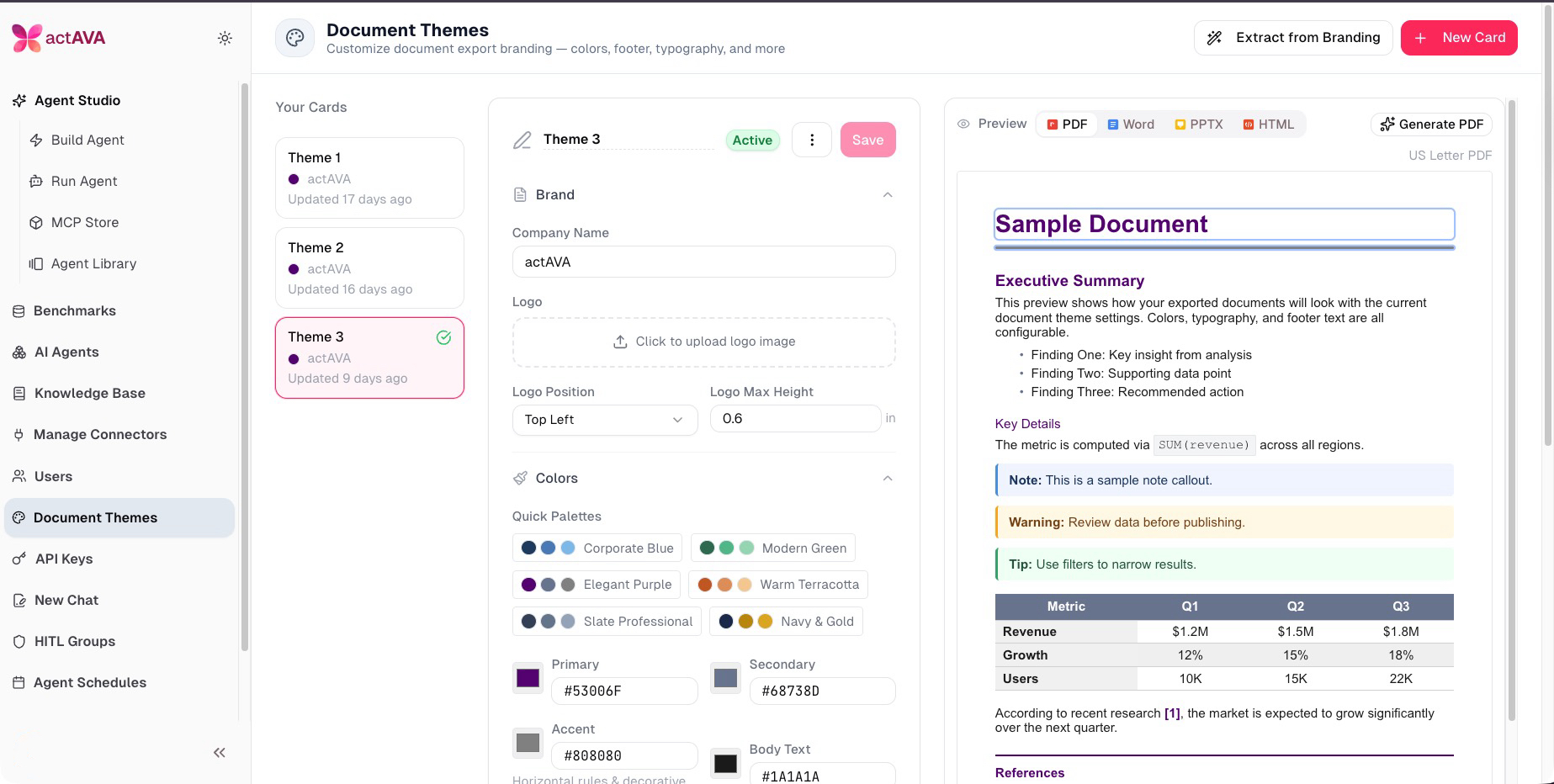
Agents now apply the organization's visual identity to all generated HTML content. Administrators configure HTML overrides in the FormatCard editor, and design guidance is injected directly into agent prompts to ensure on-brand output.
HTML overrides section in the FormatCard editor with live preview
HTML theme context and design guidance injected into agent prompts
Aesthetic inference refactored for clarity and correctness
Specialized Search Tools — Academic, GitHub & LinkedIn
Deep research across the sources that matter most.
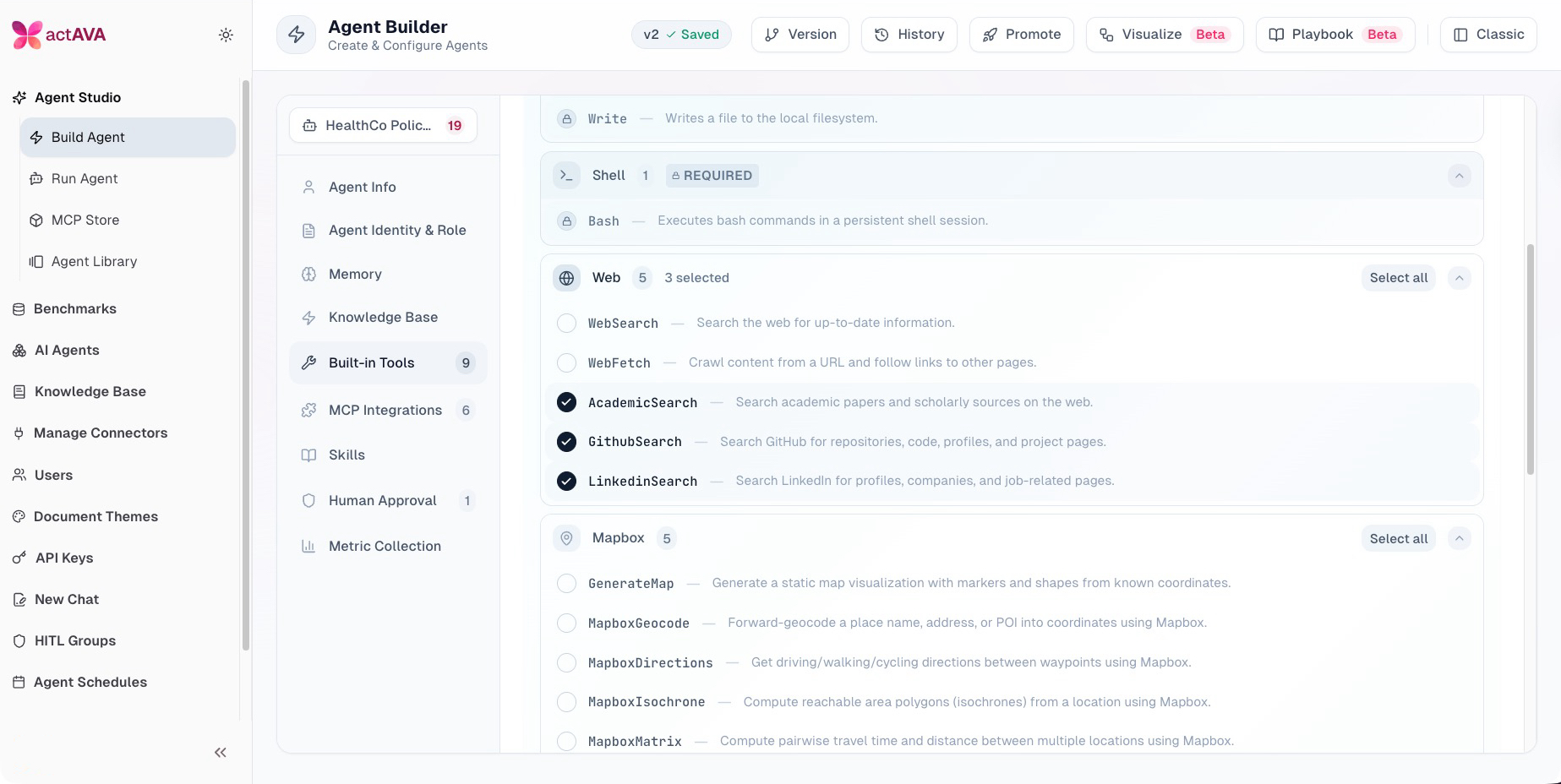
Healthcare AI agents need access to more than just the open web. This release introduces three purpose-built search tools that let agents query academic literature, scan GitHub repositories, and search LinkedIn profiles — enabling workflows like evidence-based clinical research, open-source dependency analysis, and provider/KOL identification without leaving the agent runtime.
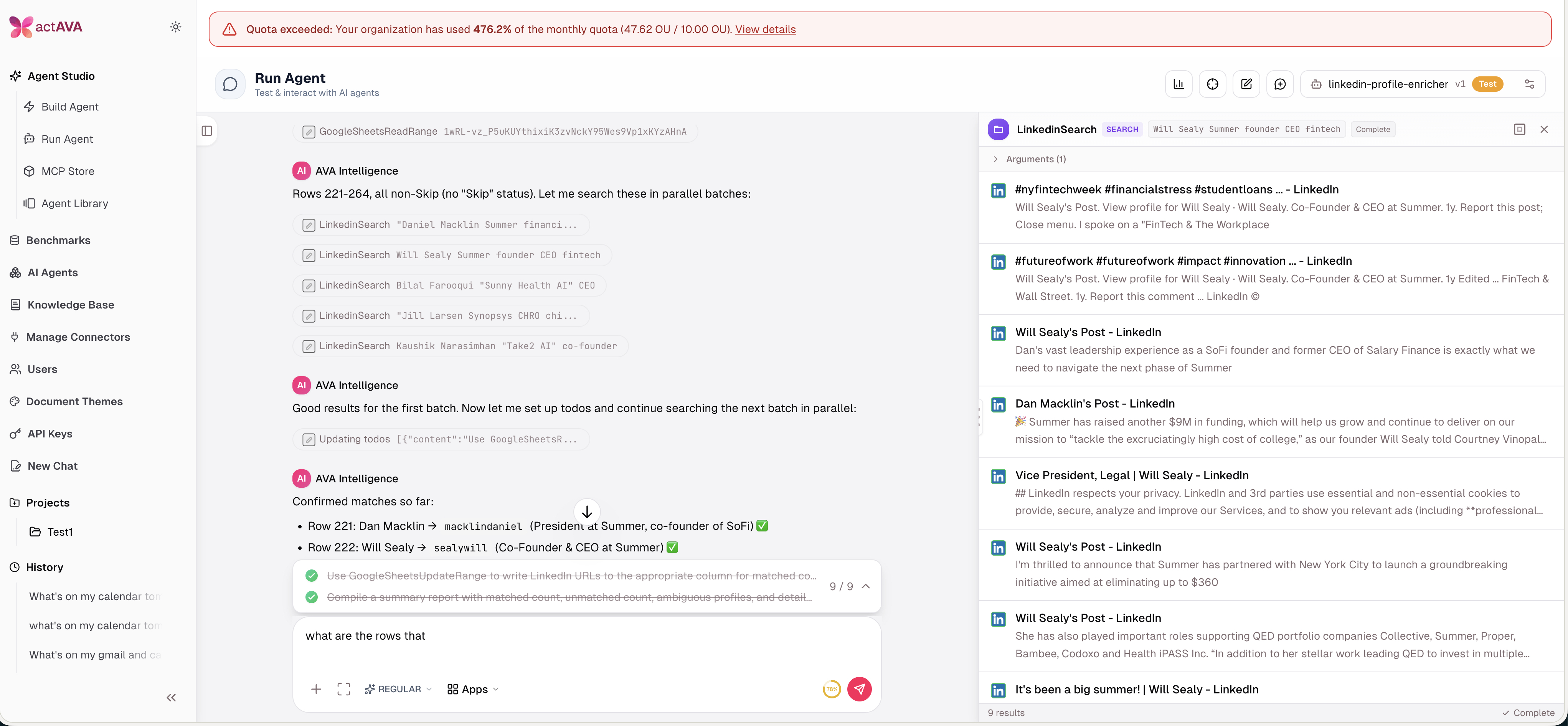
Academic Search: Query scholarly databases for peer-reviewed papers, clinical trials, and systematic reviews — ideal for formulary research, evidence synthesis, and literature-backed agent responses
GitHub Search: Search repositories, code, and issues to support technical due diligence, open-source component evaluation, and integration research
LinkedIn Search: Find professionals by role, organization, and expertise — enabling key opinion leader (KOL) mapping, provider outreach targeting, and stakeholder identification
All three tools are available in the agent builder and can be composed with other tools in multi-step workflows
Benchmark Usage & Cost Transparency
Full visibility into where agent resources are consumed.
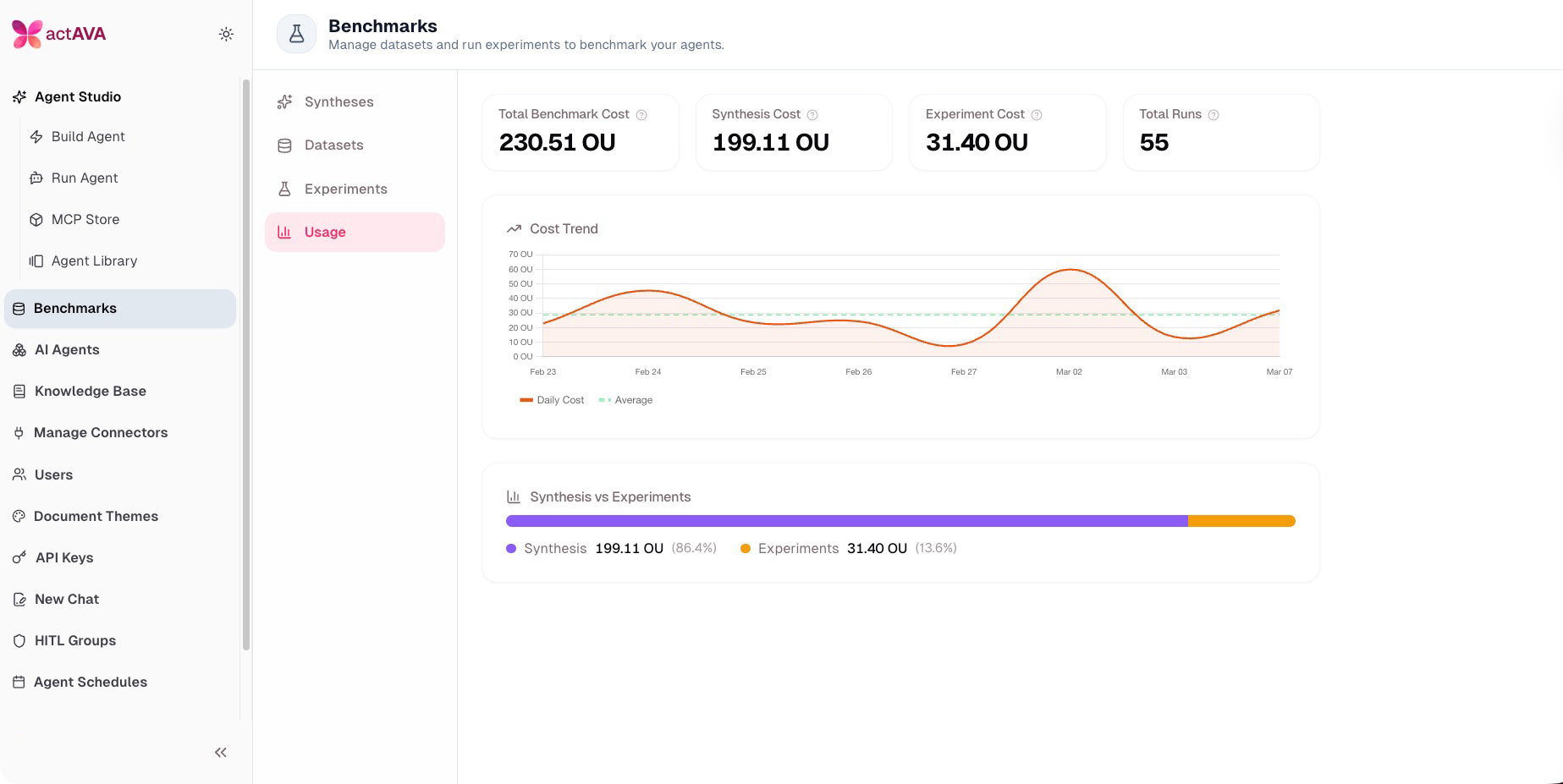
The Benchmark Usage Dashboard provides a category-level cost breakdown for every agent run, now including evaluation billing, grading-token tracking, and evaluation category costs — giving administrators the data they need to optimize spend.
Category cost breakdown queries in the agent run repository
Service-layer integration wiring cost data through to the API
New "Benchmark Usage" admin tab with visual cost breakdown by category
Evaluation billing, evaluation category costs, and grading-token billing tracking added end-to-end
Quota Enforcement
Better cost transparency for customers and enterprise-grade resource governance.
A new org beta feature blocks agent runs when the organizational unit or monthly quota is exceeded — critical for enterprise customers managing shared agent infrastructure across departments.
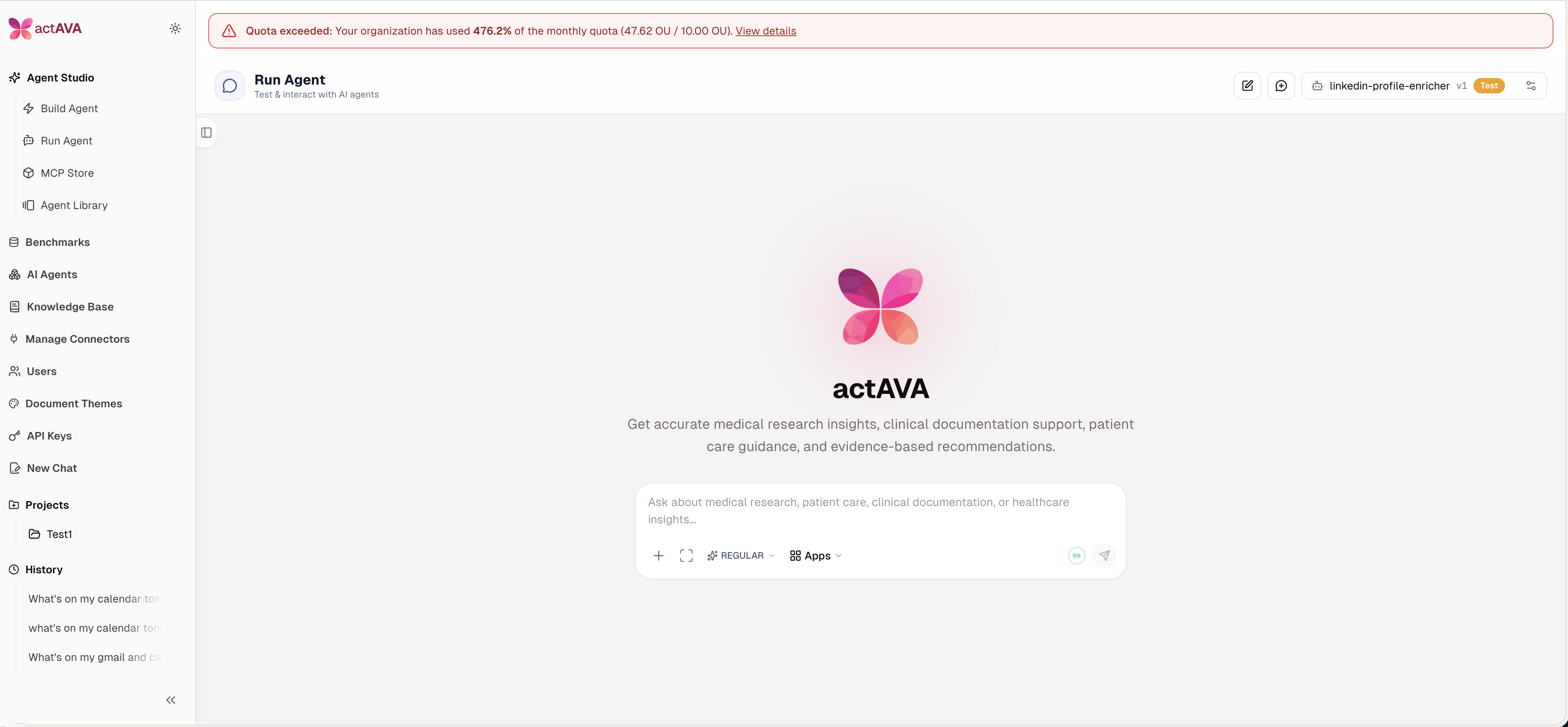
Backend schema and quota guard logic with nextgen runtime checks
Admin toggles for enabling and configuring quota limits
Usage cost breakdown now includes evaluation billing, plus evaluation category and grading-token billing tracking (spans backend, common, admin, evals, and nextgen_agent).
Context Window Usage Indicator
Real-time token budget awareness.
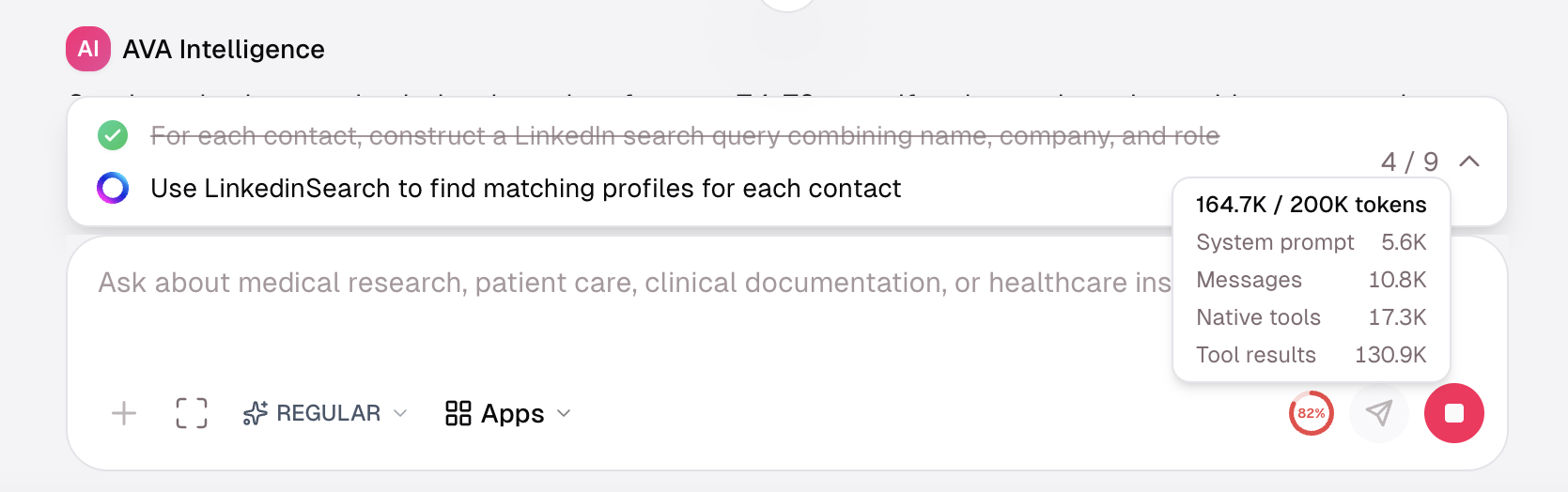
The chat interface now displays a context window usage indicator with category breakdown, helping users understand token budget consumption and the impact of context compaction in real time.
Agent Studio Improvements
AI Builder Enhancements
Major improvements to the agent building and generation experience lower the barrier to creating agents for demos, POCs, and production deployments.
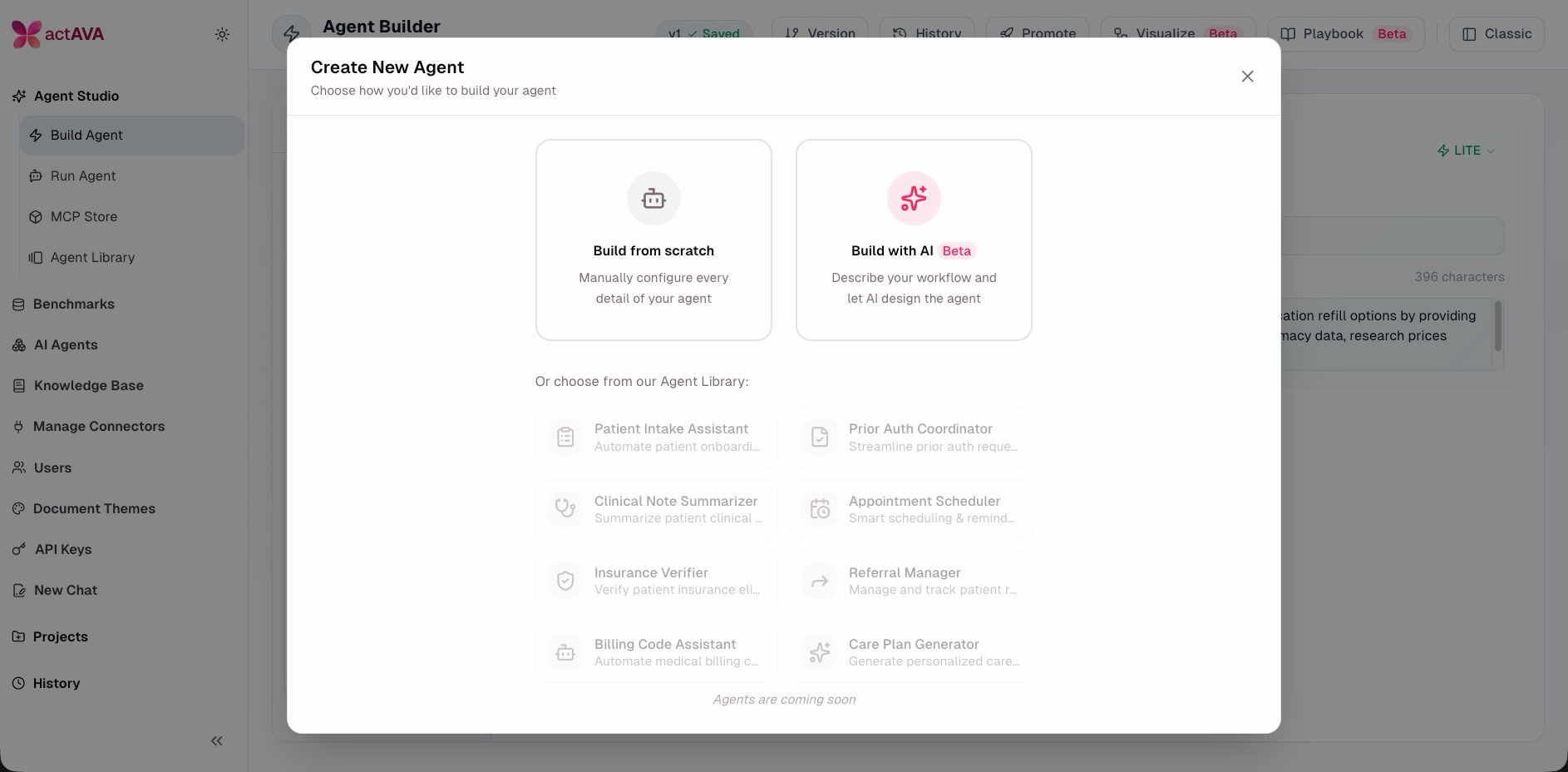
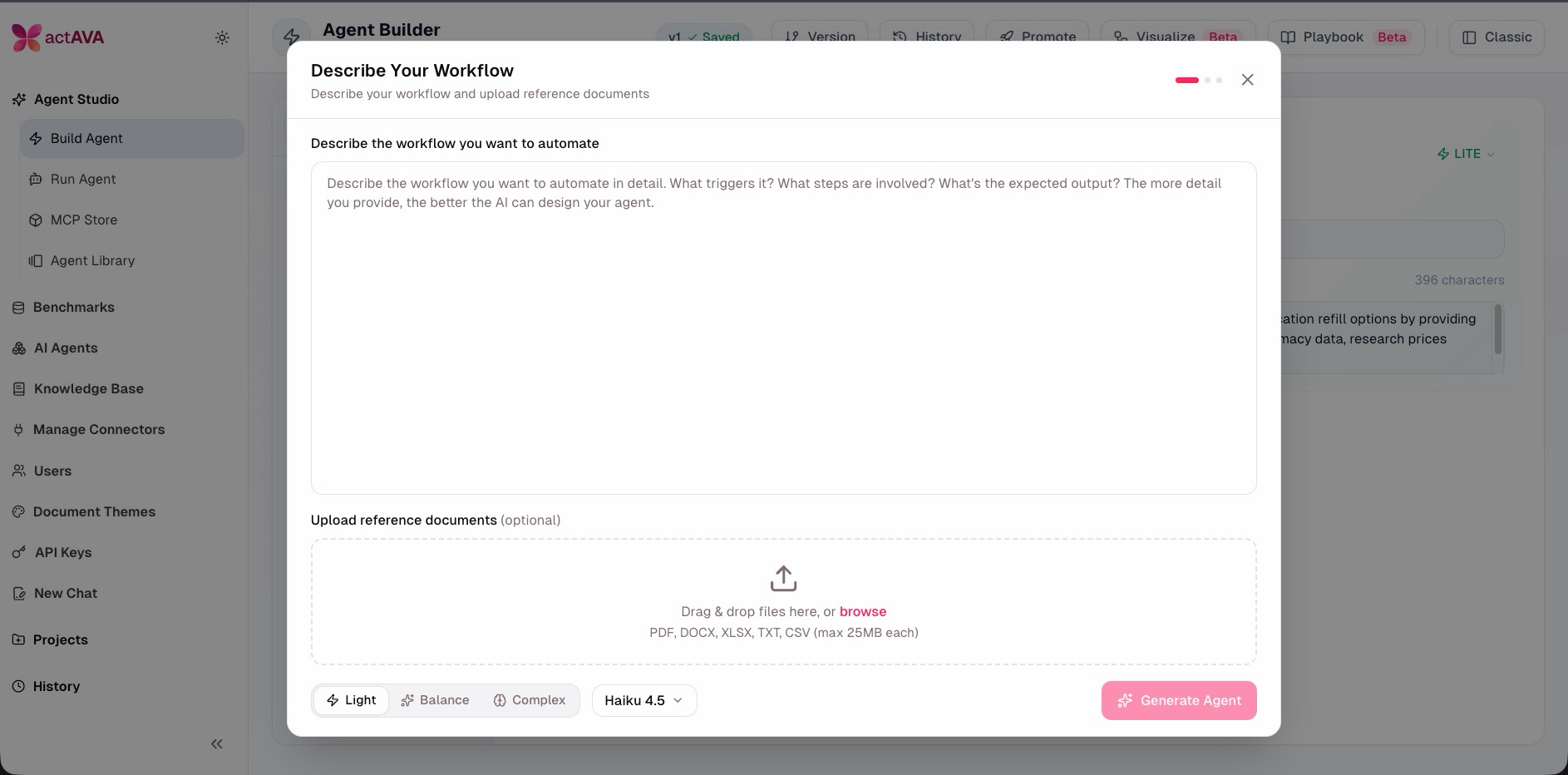
AI Builder Wizard: New guided wizard flow for agent creation
V2 Sectioned Plans: Structural v1/v2 decision framework replacing task-count heuristic, with field separation guidance
Complexity Modes: Light, balance, and complex modes with model override support
Enrichment Phase 2: Session-free enrichment generation with streamlined UI
Multi-step duration tracking fix for accurate run timing
Redis-backed shared state and session locking for improved concurrency
MCP Catalog Admin & Org-Level Access Control
Platform administration for the MCP marketplace with enterprise-grade access control.
Default servers: is_default flag on the MCP server catalog with auto-backfill in CI
Org-level access: GIN index on allowed_org_ids with type-safe checks; administrators control which MCP servers are available to which organizations
Admin endpoints with org admin authorization and default MCP servers in the marketplace UI
Internal routes are blocked at the router level for security
Run History — Search, Filter & Sort
A major UX upgrade to the run history panel for day-to-day use and demos.
Full-text search across runs
Filter by status, sort by date/cost/duration
Date grouping (Today / Yesterday / Earlier) with status indicator dots
Infinite scroll with backend search, sort, date range, and JSONB native type casts
Agent Playbook — Overview Card & Scenarios
A new "playbook" experience to make it easier for business users and experts to understand the entire scope of any agent, regardless of how complex.
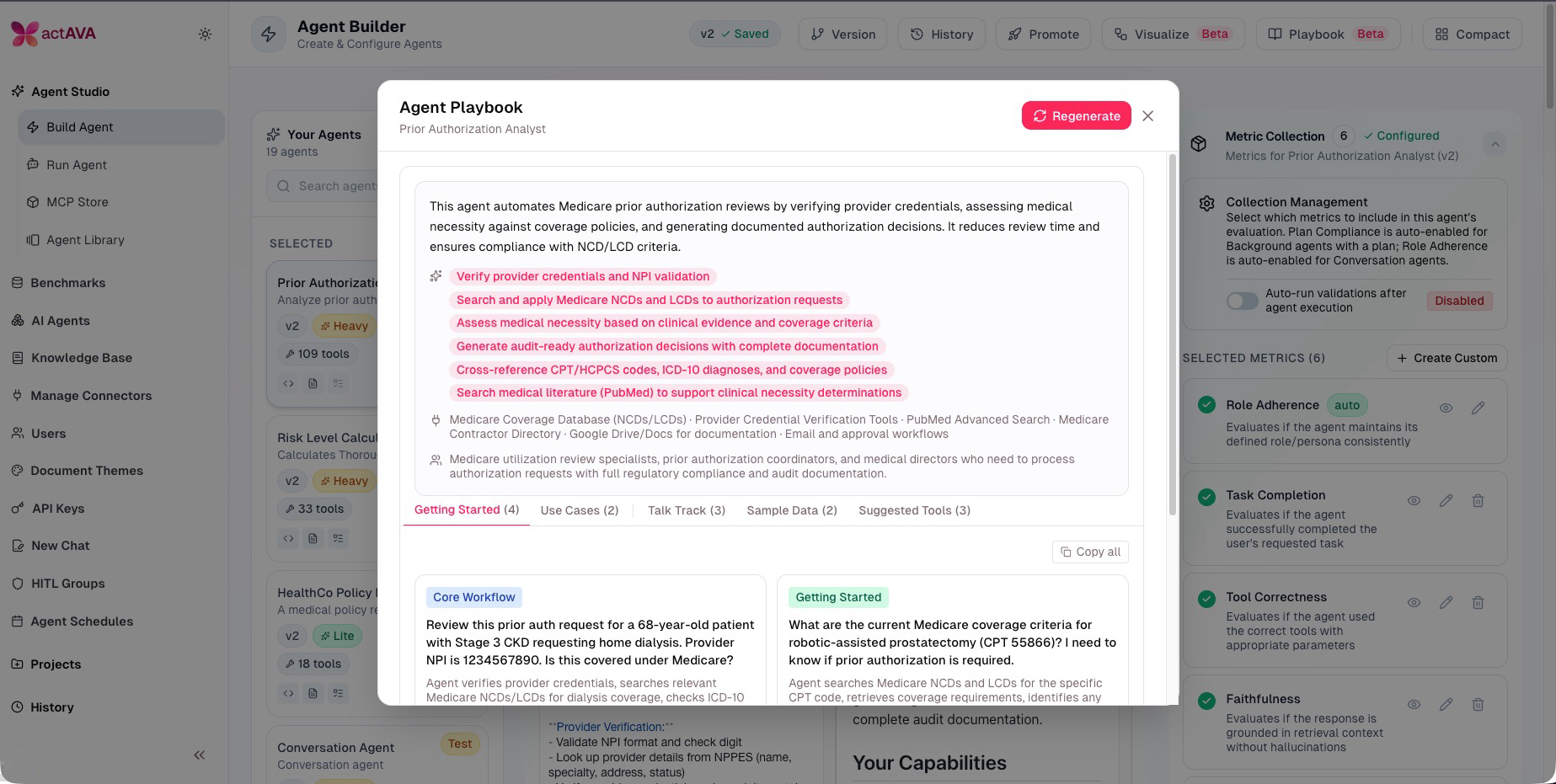
Agent Overview card with a high-level summary of purpose and capabilities
Use Case Scenarios promoted to a dedicated tab
Additional Agent Studio Improvements
Agent Import & Upgrade: force_upgrade parameter with resource compatibility validation, atomic upgrade flow, and user-friendly error messages
Agent Library Templates: Template section added to NewAgentDialog for faster zero-to-agent time
Per-Message Extended Thinking Toggle: Users can enable/disable extended thinking per message, persisted as an agent card setting
Step Handoff Approvals: Moved from side panel to inline chat cards for faster decision flow
Agent Runtime & Chat UX
Smart In-Conversation Steering
Agents now handle mid-run steer changes more reliably. In-progress tools can be cancelled cleanly when steer is applied, and steer framing is hardened so that new instructions are treated as additive guidance, reducing task abandonment and confusion.
Streaming & Chat UX Polish
Streaming sparkle animation: Animated indicator on chat messages while the agent is responding
Stop button visibility fix during streaming, planning chip flicker fix
Fixes for run-history pagination/infinite scroll, session resume approval handling, and SSE resume edge cases
Higher reliability/scalability for AI Builder sessions: migration to Redis-backed shared state and session locking, with expanded Redis client capabilities (helps stability under concurrency).
Smoother end-user workflow in agent runs: fixes for run-history pagination/infinite scroll, session resume approval handling, SSE resume edge-case errors, and Claude image-attachment 400 failures.
Evaluations & Experiments
Opus grading: Default evaluation model and rubric/metric graders upgraded to Opus for stronger grading consistency
Evaluation SDK and type system modernized
Plan-compliance checking hardened
Org-scoped access: Evaluation endpoints now use org-scoped access instead of per-user ownership
Eval panel UX improved for long metric names and failed-item sorting
Rubric scoring rules update and evaluation route refactor
Dedicated evals session type disabling HITL for eval and synthesis runs
Infrastructure & Reliability
CloudFront cache invalidation: Automatic invalidation after S3 deploys for faster content freshness
Internal auth hardening: Fail-closed behavior on internal auth endpoints; internal routes blocked at router level
CI/CD Slack notifications: Threaded deployment messages with Block Kit formatting across all submodule publish workflows
External API frontend isolation with progress passthrough
Todo panel stale-state fix with improved completion prompting
Claude image-attachment 400 failure fix
Actava.ai, The Healthcare AI Factory

Written by
Deon Metelski
Chief Product Officer
Product leader shaping agentic healthcare AI that feels human and interoperates across every clinical ecosystem. Previously a healthcare product leader at Zyter|TruCare, Deon has spent his career turning complex clinical and operational work into products clinicians trust. At Actava.ai he leads distributed teams to orchestrate safe, explainable AI agents across EHRs and connected ecosystems, translating clinical and operational needs into intuitive, dependable experiences. His work blends empathy with data, advancing healthcare AI through a product lens, and is driven by a commitment to access, interoperability, and measurable outcomes across the care continuum.